01 / EDITOR
Shape the motion yourself
Set keyframes for position, opacity, scale, and text reveal. Adjust easing and build separate entrance and exit animations around an operator-controlled hold.
 CueForge
Animate your graphics with property keyframes. Prepare cue-specific content. Stage every change before Take. One focused workspace for the people who design and run the show.
For teams creating animated lower thirds, message graphics, and event titles, CueForge puts the design controls and the live decisions in the same workflow.
Set keyframes for position, opacity, scale, and text reveal. Adjust easing and build separate entrance and exit animations around an operator-controlled hold.
Reuse a composition with different text for each cue. Create graphics from templates or CSV/XLSX content, with a review step when linked content changes.
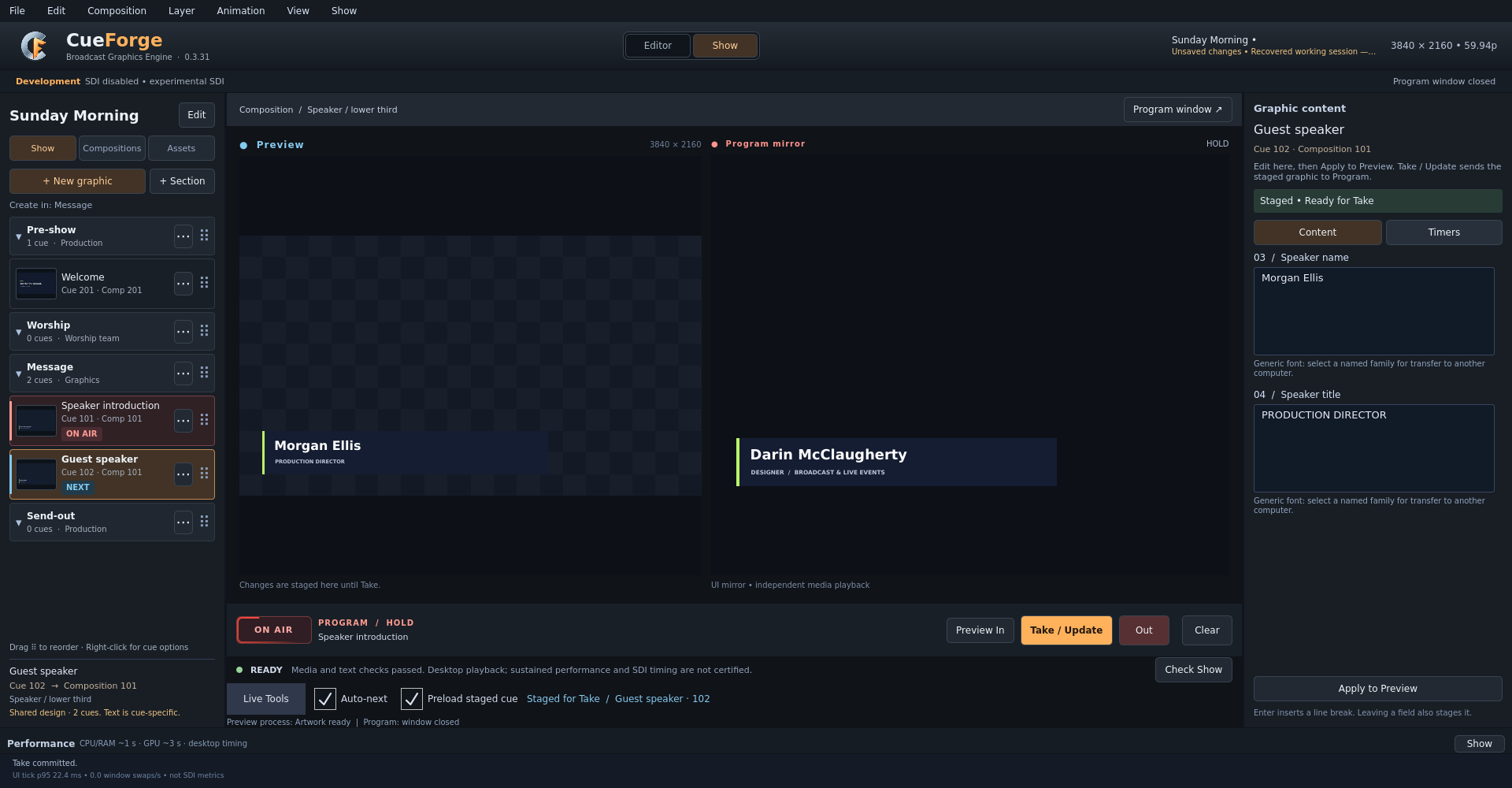
Keep changes in Preview until Take / Update. See staged content beside the Program mirror, check show readiness, and cue the exit when the moment is over.
Show mode keeps the cue list, Preview, Program mirror, live text, and take controls in one place.
Every live graphic has a journey. CueForge is designed to make the path from creating a composition to taking a cue feel direct and predictable.
Build text and graphics on a visual canvas and shape their timing in the editor.
Organize graphics into show sections and prepare the next cue before it is needed.
Review changes in Preview and send the intended result to Program.
CueForge is being built around a specific job: authoring animated graphics and taking them live. Here is how that focus sits alongside two established production platforms.
| Workflow | CueForgeDevelopment prototype | ProPresenterRenewed Vision | XPressionRoss Video |
|---|---|---|---|
| Core focus | Design + live cuesAnimated 2D graphics with a dedicated Editor and Show workflow. | Presentation, lyrics, media, and multi-screen production. | Real-time 2D/3D graphics, data, and integrated broadcast workflows. |
| Animation approach | Property-level controlKeyframes and easing, with separate In and Out tracks and a live hold. | Object builds and transitions; timelines coordinate slides, media, audio, and actions. | Object keyframes, Animation Controllers, and Scene Director timelines. |
| Prepare content | Reusable design, cue-specific textTemplates and reviewed CSV/XLSX imports. | Slide editing, SongSelect, Bible lookup, and Planning Center integration. | Templates, DataLinq, and MOS newsroom integration. |
| Live operation | Stage → Take / Update → OutPreview, Program mirror, and cue content together in Show mode. | Playlists, macros, screen Looks, and multiple outputs. | Graphics playout, automation, and Visual Logic scene control. |
| Broadcast output | Still being qualifiedExperimental Windows DeckLink key/fill. UHD throughput and timing validation continue. | Broadcast hardware output, including separate key/fill. | SD–UHD support across configurations, with multiple I/O hardware options. |
| Availability | Prototype testing. Public release and supported configurations are not yet announced. | Commercial product available today. | Commercial product available today; features depend on edition and configuration. |
A focused workflow comparison, not a performance benchmark or an exhaustive feature list. CueForge capabilities reflect prototype 0.3.31. Check each vendor’s current configuration and licensing details.
If you create the graphics and run the cues, CueForge’s direction is for you: direct animation control, repeatable content preparation, and a focused handoff to air. That balance is the product we are building and testing.
CueForge details are based on its 0.3.31 prototype documentation. Vendor descriptions establish feature availability, not comparative speed, ease of use, or reliability. ProPresenter and XPression are trademarks of their respective owners. No affiliation or endorsement is implied.
CueForge is a working prototype being shaped around broadcast production needs. The editor and show workflows are evolving through hands on testing.
Hardware output, timing, and performance are being validated. Public availability and supported configurations will be announced after that work is complete.
Our focus is a dependable path from a creative canvas to a responsive show interface and, ultimately, broadcast output.
Development preview. No release date or hardware certification announced.A new broadcast graphics workflow is taking shape.